Web · Windows · Old School RuneScape

OSRS Toolkit

Grand Exchange market analysis and profit planning for Old School RuneScape.

Plan better trades and remember what actually happened. Use it free in your browser at runescope.app, or on Windows if you'd rather have it beside the game.

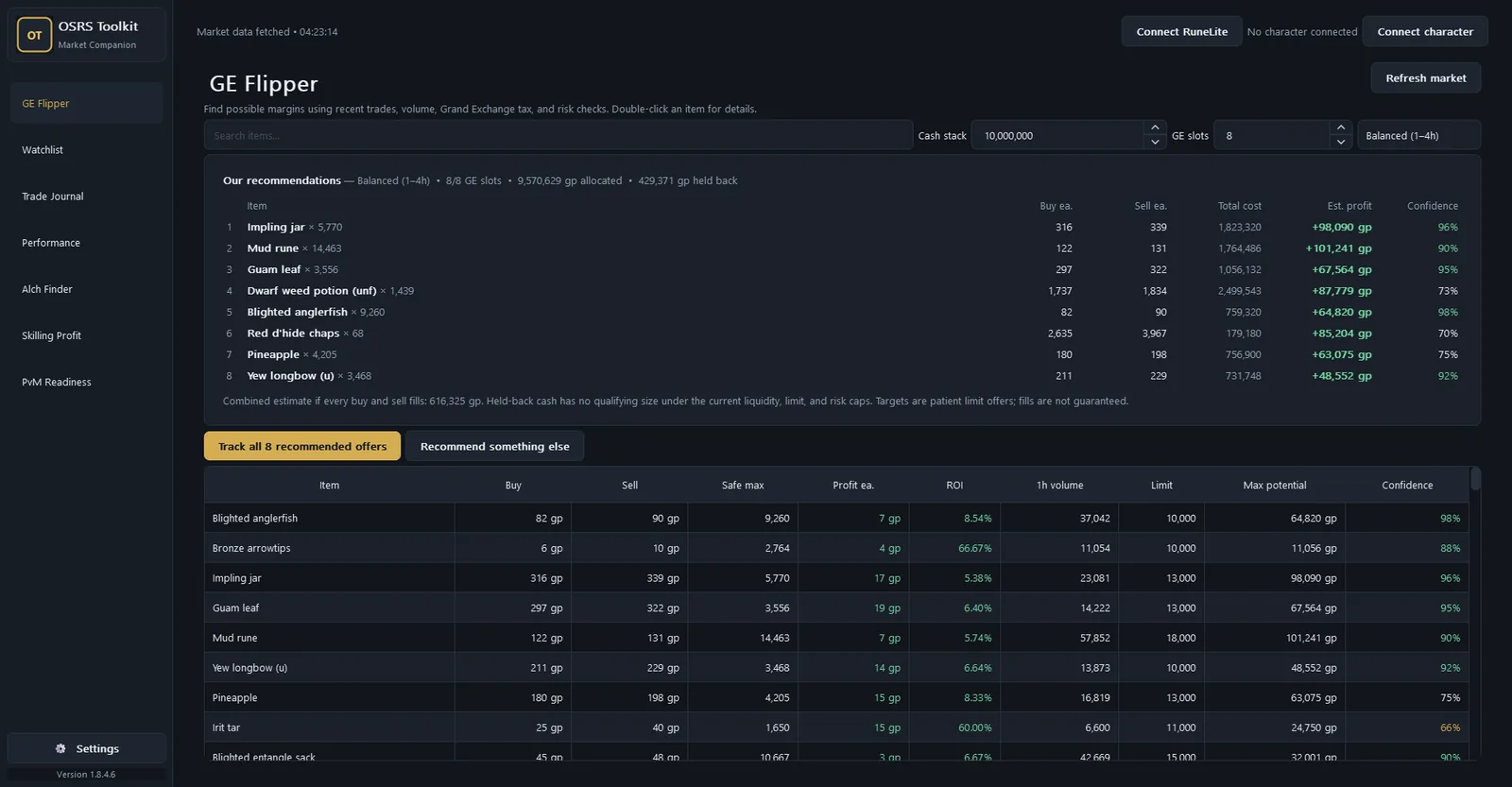
The GE Flipper screen of OSRS Toolkit: a ranked list of recommended flips with buy and sell prices, estimated profit and confidence, above a table of candidate items.
Platform
Web and Windows
Built with
Python
Latest version
1.6.0
Price
Free

What it is

OSRS Toolkit helps you make decisions about gold in Old School RuneScape, using the Grand Exchange's market data instead of guesswork.

Tell it how much cash and how many Grand Exchange slots you have free, and it plans what to buy as one set. Track the plans you like, and the journal follows every trade from offer to payout, with Grand Exchange tax counted the way the game does. Later it tells you which strategies and items actually made you money.

It also covers High Alchemy, 83 skilling methods priced off the live market, and boss gear checklists.

Nothing plays the game for you. It reads market prices and, if you choose to install the plugin, records your own trades.

Where to use it

Three ways to use it.

The same tools live in two places that share one journal, plus an optional plugin that fills the journal in for you.

  • Easiest

RuneScope on the web

runescope.app is the full toolkit in a browser tab next to the game: nothing to install, it works on any device, and you can install it as an app from the browser itself. Sign in with Discord, or with a recovery code instead of a password. New companion features land here first.

Open runescope.app
  • Beside the game

OSRS Toolkit for Windows

The same tools in their own window, sharing one journal with the website. Choose the setup installer, which updates itself, or a portable zip. The builds aren't code-signed yet, so Windows may warn about an unknown publisher.

Download for Windows
  • Optional

RuneLite plugin

OSRS Toolkit Sync records your Grand Exchange fills while RuneLite is running and sends them to your RuneScope account, so the journal fills itself in. Install it from the RuneLite Plugin Hub. It sends nothing until you turn it on and pair it with a token.

View the plugin

Screenshots

See it in action.

Highlights

From market data to a clear plan.

GE Flipper

Plans what to buy with the cash and free slots you have, sized to buy limits and with Grand Exchange tax already taken out.

Trade journal

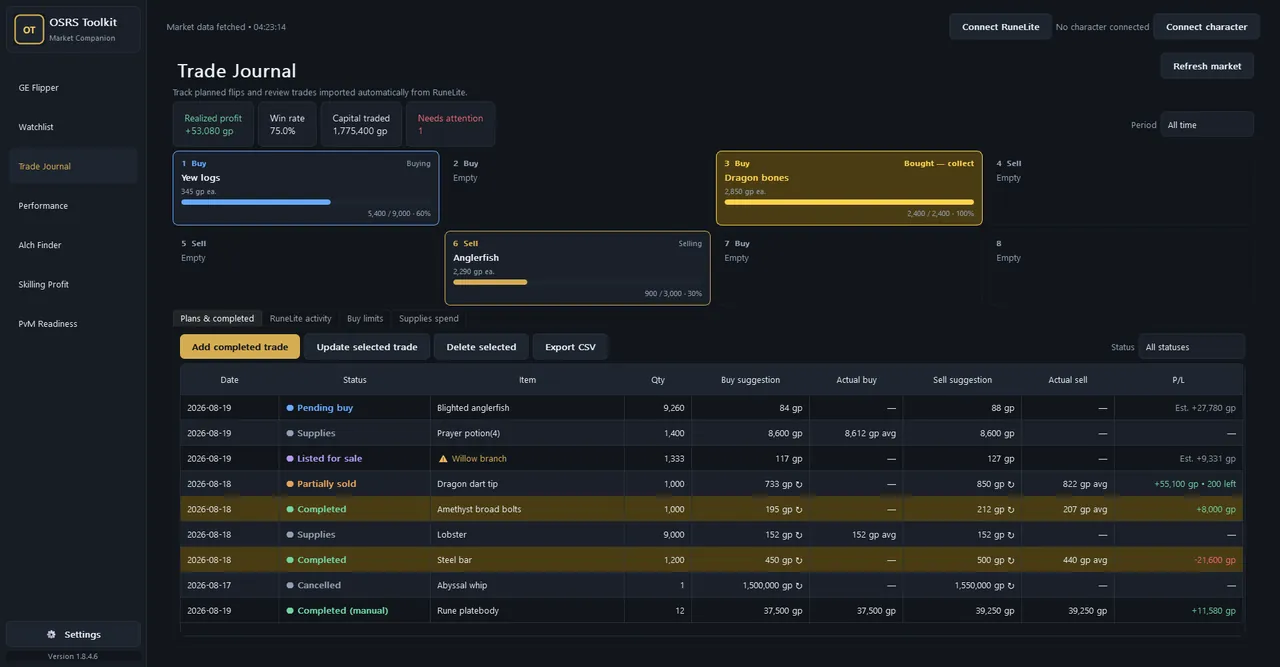
Every position from offer to payout, partial fills included, with profit that counts Grand Exchange tax the way the game does.

Performance

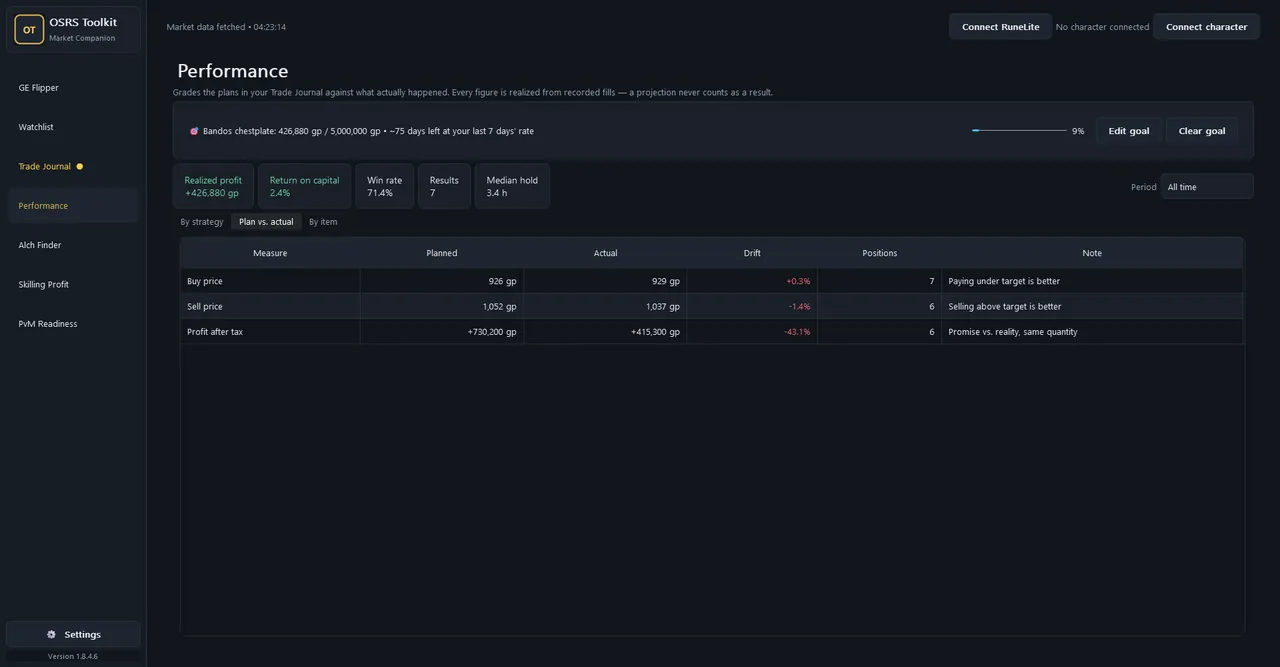
Grades which strategies and items actually made you money, and shows your plan against what really filled.

RuneLite sync

The companion plugin sends your real fills, so there's nothing to type out by hand.

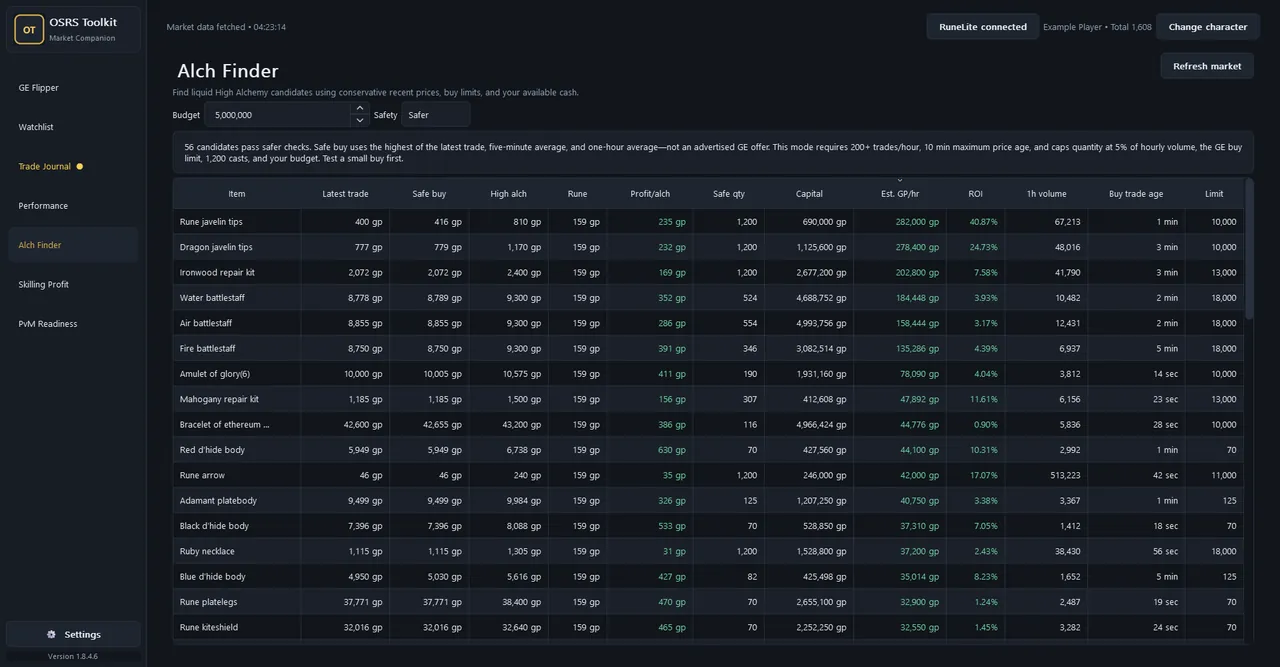
Alch Finder

What's worth high-alching today, after nature runes and after what it costs to buy.

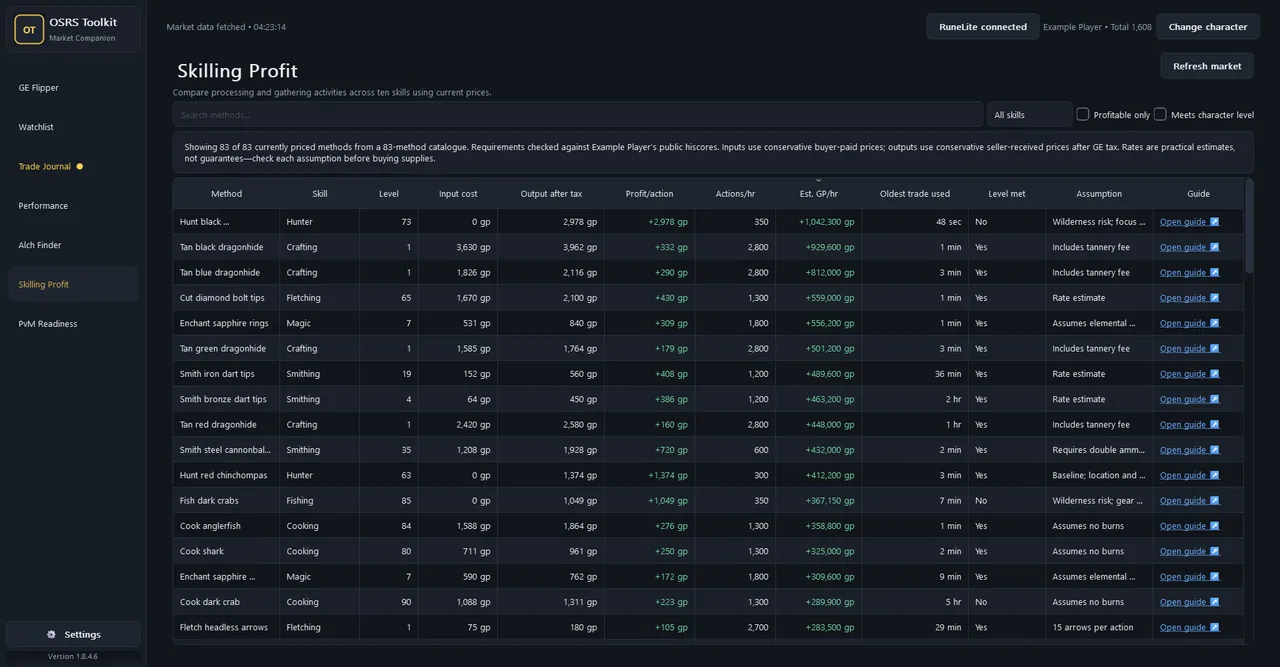
Skilling profit

83 methods across 10 skills, priced off the live market, each linking to an OSRS Wiki guide.

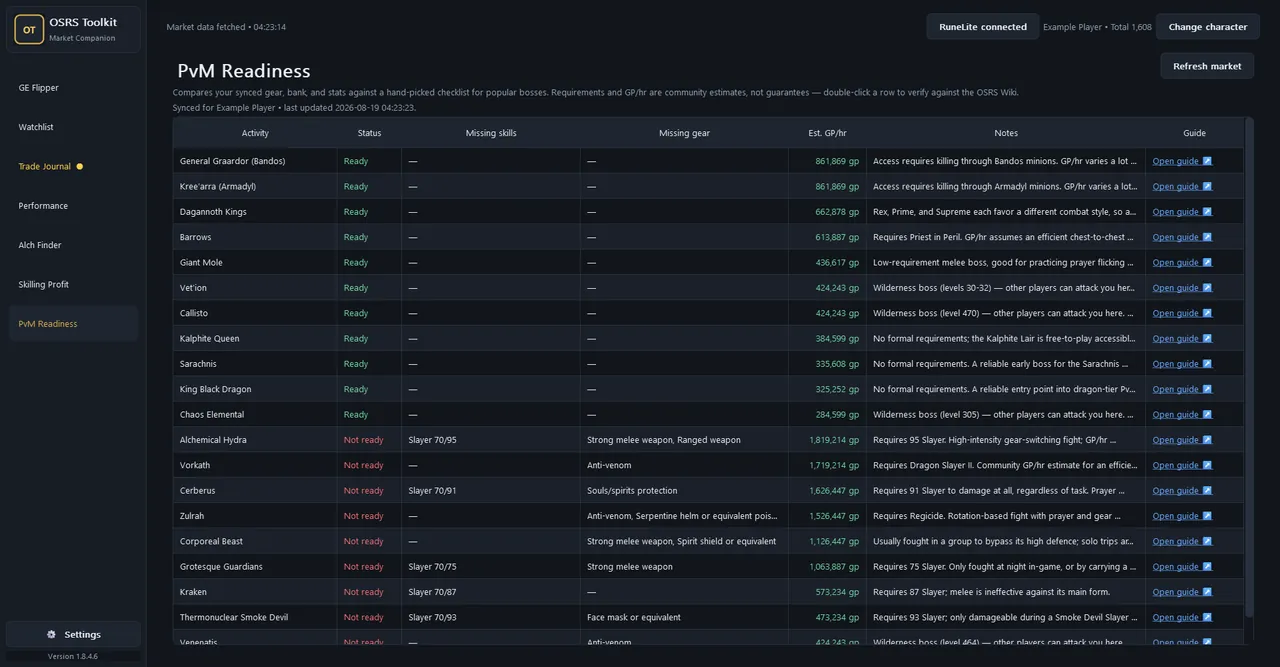
PvM readiness

Your gear, bank and levels against checklists for 20 bosses: what you can do now, and what you're missing.

Browser or Windows

Use runescope.app anywhere, or the Windows app beside the game. They share one journal.

Your journal, your data

Signed out, the Windows app is fully offline. Signed in, your journal syncs between your devices and goes nowhere else.

Getting started

From open tab to first flip.

  1. Open RuneScope

    Go to runescope.app and sign in with Discord, or create an account with a recovery code. It's free, with no password and no email address. Prefer a window beside the game? Download the Windows app instead.

  2. Set your cash and slots

    Enter the GP you want to put to work and how many Grand Exchange slots are free, from 1 to 8.

  3. Pick a strategy

    Choose Quick, Balanced or Overnight, then look over the targets, sizes and confidence for each pick.

  4. Track the set you like

    Then go and place the offers in-game, and be patient with them.

  5. Record what fills

    Type fills in by hand, or install the RuneLite plugin and let it record them for you.

  6. Check how it went

    Performance compares your plan with what actually happened, so next time you know what works.

In detail

How each part works.

GE Flipper

Say how much GP you want to put to work, how many slots are free (1 to 8) and whether you want Quick, Balanced or Overnight. It plans those slots as one set, sized by your cash, the four-hour buy limit, how much each item really trades and how much risk the strategy allows.

Items are dropped for prices that are too old, trading on only one side, prices that swing too much, or margins too thin to survive slippage. For each pick you see the buy and sell price to offer, the most you should safely buy, profit after tax, ROI, hourly volume and a confidence score.

Prices are completed trades

The prices shown are trades that already happened, not offers sitting in the Grand Exchange. Confidence is about how good that data is; it isn't a promise the offer will fill or make money.

Prices come from the OSRS Wiki real-time price API, and the age of the trades behind each result is shown in its own columns.

Trade Journal

Anything you track arrives as Pending buy and moves through Bought, Listed for sale, Partially sold, Completed or Cancelled. Record as many buy and sale fills as you need, at whatever quantities and prices, and both sides average by quantity.

You see realized profit with tax taken off, win rate, capital traded and which positions need attention, and you can export everything as CSV. With the plugin, all eight Grand Exchange slots sit above the journal the way the game lays them out.

Performance

The toolkit suggests a strategy and some target prices; the journal records what you actually got. Performance puts the two side by side: results by strategy, by item, and plan against actual, weighted by quantity.

Every number comes from fills you recorded. A projection never counts as a result.

Alch Finder and Skilling Profit

Alch Finder assumes you'll pay the highest recent price buyers have paid and takes today's nature rune cost off the top, with Safer, Balanced and Show all settings. Skilling Profit prices 83 processing and gathering methods across 10 skills, with realistic actions per hour and notes on the things that ruin the maths.

These are baselines, not promises.

The plugin and PvM readiness

OSRS Toolkit Sync records partial and complete Grand Exchange fills, plus the moment you place or cancel an offer, so a position starts when you place the offer rather than when it fills. Player trades and PvM gear sync are off by default.

With gear sync on, opening your bank in-game lets PvM Readiness check your gear, bank and levels against hand-written checklists for 20 bosses. The plugin never logs into anything, clicks anything or changes your offers, and the sync service behind it is open source too.
Questions

Good to know.

Should I use runescope.app or the Windows app?

Most people are better served by runescope.app: the same tools, nothing to install, and new features land there first. The Windows app is for anyone who'd rather have a separate window beside the game. They share one journal when you sign in.

Do I need the plugin?

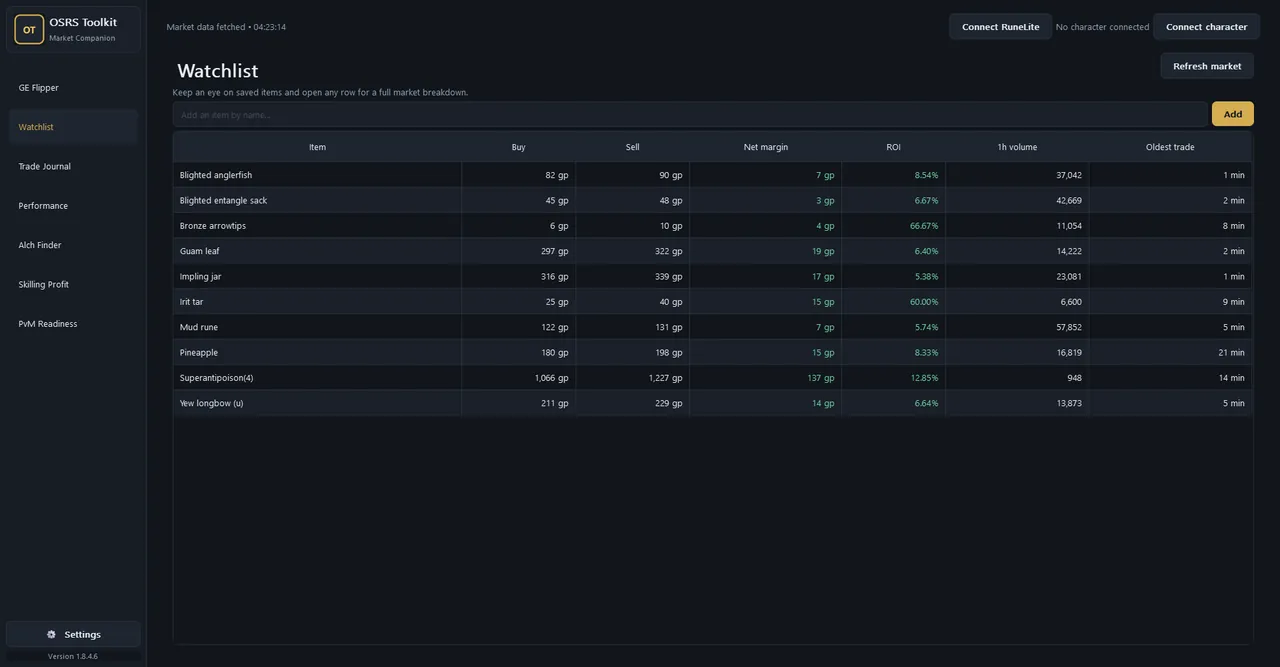
No. GE Flipper, Watchlist, Alch Finder and Skilling Profit only need prices, and you can keep the Trade Journal by hand. The plugin records fills for you, powers the live Grand Exchange slot panel, and is needed for PvM Readiness verdicts.

Does it play the game for me?

No. Nothing plays the game for you. The plugin never logs into anything, clicks anything, touches your offers or asks for your Jagex login. OSRS Toolkit is an independent fan project, not affiliated with or endorsed by Jagex.

What data does it send, and where?

Signed out, the Windows app is fully offline: your journal stays on your PC. Signed in, trade and position data goes to the account you signed into and nowhere else. Prices come from the OSRS Wiki API, update checks from GitHub Releases and character lookups from the public hiscores. It never asks for or stores a Jagex password, bank PIN or authenticator code.

Why do some prices look old?

"Market data fetched" is when the app got the newest data, not when each item traded. Quiet items might not have traded for half an hour or more, so a fresh download can still show old prices for them. The Oldest trade columns show how old the real trades behind each result are.

Will it make me a profit?

Everything here is an estimate, not guaranteed profit. Grand Exchange prices move, odd trades can skew the data, and an offer at a suggested price may simply never fill. Buy a few supplies and sell a few outputs before you commit a big stack.

Do I need an account on runescope.app?

To use it on the web, yes, but it's free and needs no password or email address: sign in with Discord, or create an account and keep the recovery code it gives you. That code is the only way back into an account that doesn't use Discord, so save it somewhere.

Ready to plan your next flip?

Open it in your browser, or download the Windows app. Both are free and share one journal.